
You have printed a QR code on hundreds of flyers, product labels, or business cards. Then the destination changes: your website moves, an event page is replaced, or a campaign needs a different landing page. Can you update the QR code without printing everything again?
The answer depends on what the printed symbol contains and whether you control the address it opens. Understanding static vs dynamic QR codes helps you choose the right setup before distributing your design.
Key takeaways
- Every printed QR code contains fixed encoded data that cannot be changed after printing.
- A static QR code typically contains a direct URL, while a dynamic QR code typically contains a stable redirect URL.
- You can change the final destination without reprinting if you control the encoded URL and its redirect configuration.
- Editable redirects depend on maintaining the domain, hosting or redirect service, and necessary access permissions.
What Is the Difference Between Static and Dynamic QR Codes?
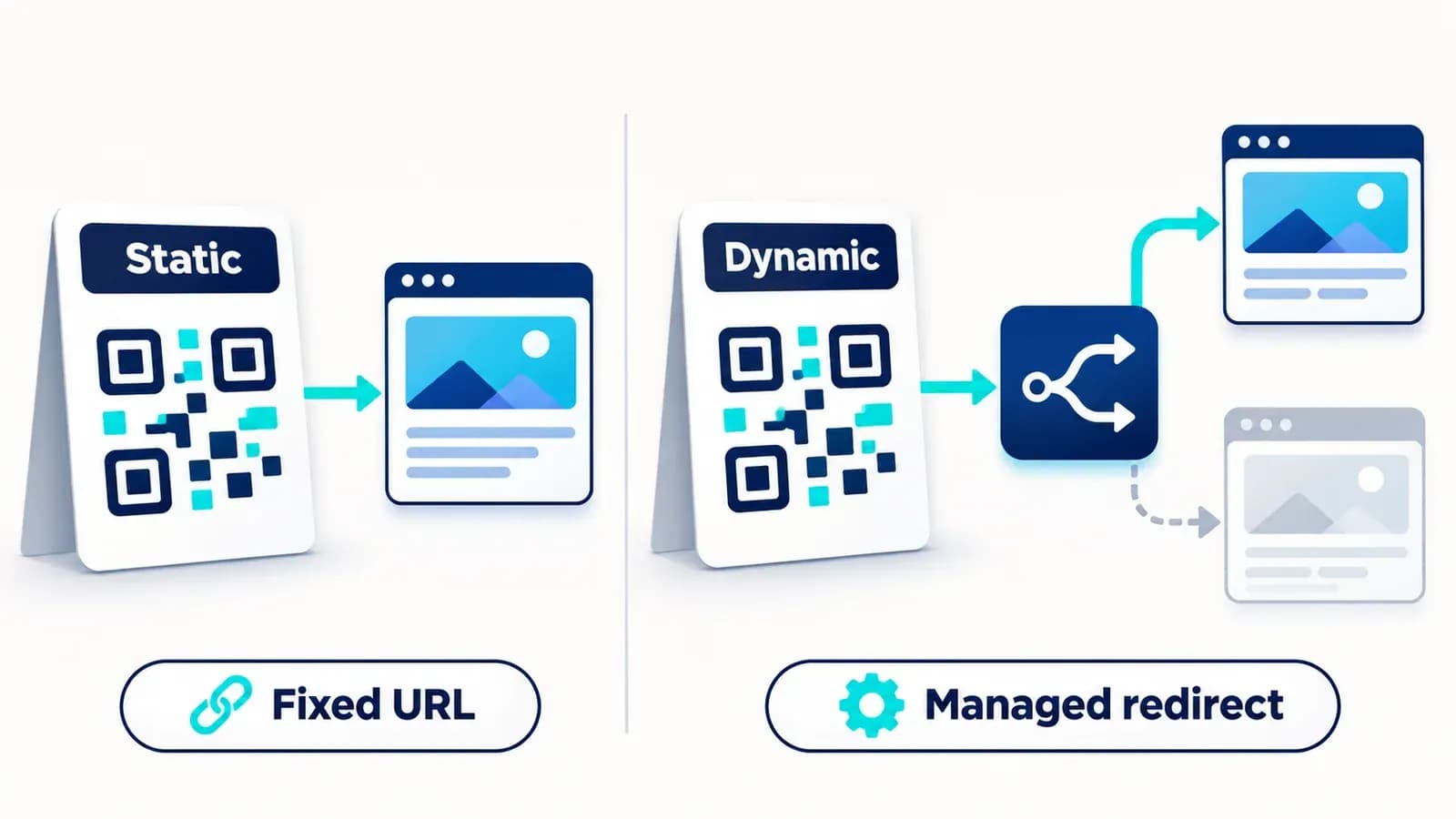
The main difference is not that one printed pattern changes while the other stays still. Both are fixed images once printed. The difference is how their encoded information is used.
Static QR codes store their destination directly
A static QR code can contain a website URL, plain text, contact information, or other supported data. For a typical website QR code, the encoded data is the destination URL itself.
For example, imagine a QR code contains https://example.com/menu. A compatible scanner reads that address and offers to open it. The QR code does not need an independent QR management provider to resolve its encoded URL.
If the restaurant later moves its menu to another address, the printed code still contains https://example.com/menu. The restaurant may be able to maintain that path or redirect it if it controls the website. However, it cannot rewrite the data inside the already printed QR symbol.
Dynamic QR codes usually use an intermediate URL
A dynamic QR code, in the common marketing sense, normally contains a stable short link or managed URL rather than the final destination.
For example, the printed symbol might contain https://go.example.com/menu. When someone opens it, the server sends the visitor to the current destination, such as https://example.com/menu-v2.
An authorized administrator can later change the redirect destination to https://example.com/menu-v3. The printed QR code stays exactly the same because its original intermediate URL remains unchanged.
Illustrative example: Printed QR data: https://go.example.com/menu. Original redirect destination: https://example.com/spring-menu. Updated redirect destination: https://example.com/summer-menu. The redirect configuration changes; the printed QR pattern does not. These addresses are conceptual examples, not working campaign demonstrations.
URL forwarding is a normal web mechanism. Cloudflare's redirect documentation explains how a source URL can forward visitors to a target URL through an HTTP redirect.
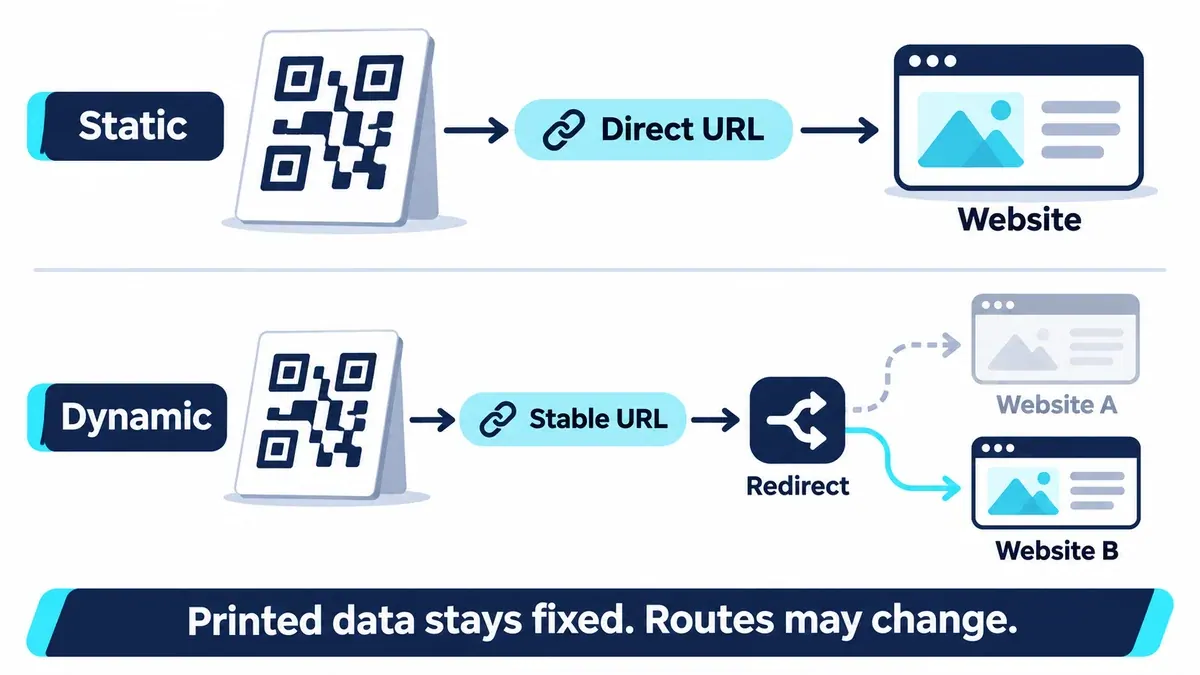 With redirect-based QR codes, the server-side destination can change while the encoded URL stays the same.
Static vs Dynamic QR Codes: Side-by-Side Comparison
| Feature | Static QR code | Dynamic QR code |
|---|---|---|
| Encoded data after printing | Fixed | Fixed |
| Typical encoded URL | Final destination | Intermediate or managed URL |
| Change the printed pattern remotely | No | No |
| Change where the link eventually leads | Possible if the encoded URL is under your control | Usually possible through the redirect configuration |
| Requires a specialized QR management platform | No | Not necessarily; a controlled web redirect may suffice |
| Depends on an extra redirect service | Not inherently | Usually, unless self-managed |
| Scan analytics | Not inherent to the symbol | May be available through the redirect infrastructure |
| Account or subscription requirements | Depend on the creation tool | Depend on the management provider or infrastructure |
| Suitable for stable information | Yes | Yes |
| Suitable for frequently changing destinations | Only with control of the encoded address | Usually more convenient |
The terms describe common implementation patterns, not two completely different kinds of printed QR symbols. A website owner can sometimes give a conventional static URL the same practical destination-editing benefit by controlling a redirect at that address.
Can You Change a QR Code After Printing?
You cannot change the bits represented by a QR code that has already been physically printed. You can, however, sometimes change what happens when someone uses that fixed data.
Scenario 1: The printed QR code contains a final website URL
Suppose the QR code contains https://example.com/events. If you control that website, you can replace the content at the same address or configure the website to redirect visitors somewhere else.
In this situation, the code works with the updated destination even though it was originally created as a conventional static URL QR code. The flexibility comes from your control of the URL, not from editing the QR symbol.
Scenario 2: The printed QR code contains a managed redirect URL
A QR management service may let you update the destination associated with a particular intermediate URL. If the service remains available and your account retains the necessary permissions, changing the destination can be straightforward.
Before relying on this arrangement, confirm whether the editing feature remains available over time, whether the service imposes account restrictions, and who controls the intermediate domain.
Scenario 3: The printed code contains text, contact details, or Wi-Fi credentials
For data such as plain text or directly encoded Wi-Fi credentials, changing the real-world information does not modify the printed code. If the encoded password changes, a new QR code will generally be necessary.
You may avoid reprinting if the code instead opens a maintained webpage that displays the current information. That is a different design, with different connectivity and privacy considerations.
Scenario 4: You no longer control the encoded URL
If the URL belongs to a third party that no longer provides access, or its domain stops working, you might have no practical way to preserve the original QR code's intended behavior.
Reprinting with a new controlled URL may then be the only dependable solution.
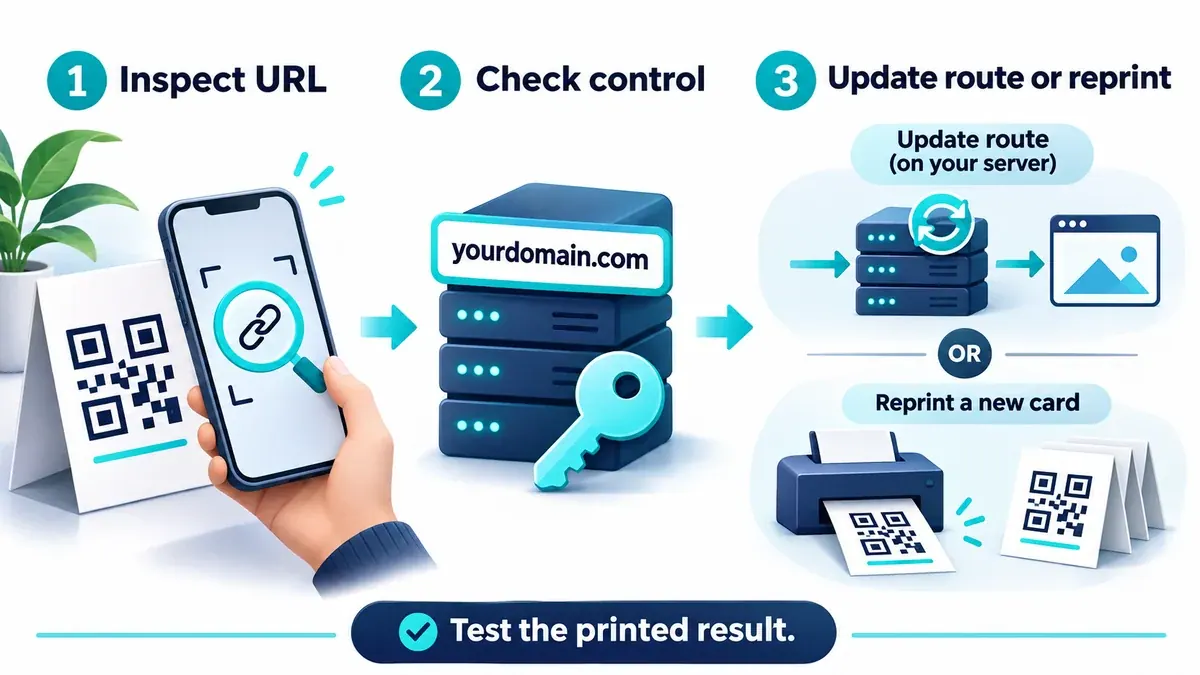 Inspect the encoded URL and its ownership before deciding whether to update routing or reprint.
How Does an Editable QR Redirect Work?
A managed redirect separates the printed address from the destination that visitors ultimately reach.
- Create a stable URL. Choose an intermediate address you can maintain, such as
https://go.example.com/offer. - Encode the stable URL. Generate a QR code containing that exact address.
- Configure the destination. Arrange for the URL to redirect visitors to the intended webpage.
- Print and distribute. Keep the encoded URL and printed pattern unchanged.
- Update the redirect when necessary. Change the server-side target while preserving the original intermediate address.
- Verify the result. Scan a real print sample and confirm that the expected destination opens.
This is conceptually similar to forwarding an old webpage address to a new one. Depending on the implementation, the redirect might be configured through a website server, hosting platform, domain provider, or dedicated QR management service.
For practical examples of configurable redirects, see Cloudflare's URL forwarding examples. Some redirect systems distinguish between temporary and permanent redirects. For example, HTTP 301 and 302 communicate different redirect intentions. Browser caching can also affect how quickly a changed redirect is observed, so test the actual implementation rather than assuming every update takes effect immediately on every device.
Does a Dynamic QR Code Need a Subscription?
Not always. The word dynamic does not technically require a paid QR subscription. What you need is a stable URL and a way to control its forwarding behavior.
A hosted provider may offer editing through an account dashboard, subject to its own pricing, limits, policies, and availability. A website owner may instead configure redirects through infrastructure already under their control.
Those approaches involve different responsibilities. With a hosted provider, you depend on its service and account terms. With a self-managed redirect, you become responsible for maintaining the domain, hosting or routing configuration, security, and continuity.
Never assume that a dynamic QR code will remain editable forever or that the printed address can be transferred to a different provider. Check the actual contract and technical setup before a large print run.
What Happens If a Dynamic QR Service Shuts Down?
The result depends on who owns and operates the intermediate URL.
If the printed code points to a provider-controlled domain and the provider stops serving that address, the QR code may stop reaching the intended destination. Moving to another service cannot automatically change the old printed URL.
If the printed code uses your own domain and you retain control of its DNS and hosting or redirect infrastructure, you may be able to migrate the routing setup while keeping the printed URL unchanged.
Domain ownership is therefore a major consideration for long-lived physical assets such as packaging, signage, instruction manuals, and permanent labels.
Key takeaways
Can Static QR Codes Track Scans?
A QR symbol does not automatically know when someone scans it. Scanning is initially an action performed by the reader's device.
If a QR code opens a website, the website may collect ordinary visit information according to its technical configuration and privacy practices. A redirect endpoint may also record incoming requests if logging is enabled.
That does not mean every camera scan produces a recorded visit. Someone might preview the destination without opening it, decline navigation, remain offline, or encounter a blocked request.
A hosted QR platform may offer analytics such as redirect requests or campaign reporting, but the available metrics, retention, accuracy, and privacy controls differ between providers.
Likewise, a conventional static QR code can point to a URL with campaign parameters or a tracked landing page. Tracking possibilities come from the web infrastructure, not from a special scanning ability inside the QR symbol.
Important distinction: A recorded redirect request is not necessarily a unique human scan, and a website session is not necessarily the same as an attempted scan.
Are Dynamic QR Codes More Secure?
Neither approach is automatically safer in every situation.
A direct URL can be easier to inspect because its intended destination is visible in the encoded data. However, that website might itself redirect elsewhere, change content, or become compromised.
An intermediate redirect can provide useful operational flexibility, but it also adds a component that must remain trustworthy. Whoever controls that component may be able to change the final destination.
For users, the best precaution is to check the destination shown by the device before opening a QR link, especially when a code appears on an unexpected sticker, payment request, or unfamiliar public surface.
For publishers, use HTTPS, keep domain access secure, limit administrative permissions, monitor destination changes, and avoid misleading link presentation. Any collection of personal data should follow applicable privacy requirements and accurately reflect what is collected.
Which Type Should You Choose?
Start with one question: will the destination need to change while the printed QR code stays in circulation?
Choose a direct static URL when...
- The destination is expected to remain stable.
- You want a straightforward link without an additional QR management dependency.
- You are generating a QR code for a personal website, portfolio, or relatively permanent resource.
- You can replace the printed material if the underlying data changes.
Choose a controlled redirect when...
- The destination may change repeatedly.
- The printed materials are expensive or difficult to replace.
- You operate campaigns, menus, promotions, or frequently updated resources.
- You can reliably maintain the redirect URL and its associated infrastructure.
Consider a self-managed redirect when...
- You own the relevant domain.
- You have access to website or routing configuration.
- You want to reduce reliance on an unrelated provider-controlled short-link domain.
- You can maintain, document, secure, and periodically test the redirect setup.
A self-managed redirect is not inherently free of costs or maintenance. Domain registration, hosting, operational work, and security responsibilities still apply.
How to Plan a QR Code Before Printing
Before creating the final artwork, decide what data the code should contain. For a stable link, you can begin with a regular website URL. For a changeable destination, establish the intermediate URL and its routing mechanism first.
Then follow this checklist:
- Confirm the exact encoded URL.
- Check whether you control that URL for the intended lifespan of the print.
- Decide whether the destination needs to change later.
- Verify your account, domain, and redirect responsibilities.
- Generate the QR code from the final stable address.
- Use a clear quiet zone and sufficient contrast in the artwork.
- Test the printed design at its intended size and scanning distance.
- For managed redirects, test destination updates before distributing the print run.
- Maintain a record of the destination and the person or system authorized to change it.
If you are starting with a direct website link, use the FreeCodeQRGenerator tool to create a static QR code locally, without an account. For step-by-step instructions, see our guide on how to create a QR code for a website link. If you want to change the final destination after printing, first configure a stable URL with a maintained redirect through your own website or a separate redirect service, then generate a static QR code for that URL.
Ready to create a QR code? Choose the web address you want the printed code to contain, confirm that the address is appropriate for your future plans, and create your QR artwork.
Explore the QR Code GeneratorFrequently Asked Questions
Can I edit a QR code after printing it?
You cannot change the encoded data of a printed QR code. You may be able to change the destination reached through its URL if that URL is controlled by a website or redirect service you can update.
Can a static QR code become dynamic later?
Not by rewriting its printed pattern. If the code already contains a URL you control, you may be able to add a redirect or update the content at that address. If it contains an unrelated address you cannot manage, this may not be possible.
Do dynamic QR codes expire?
The printed symbol does not have an inherent expiration date, but the encoded URL can stop working. Provider terms, domain renewal, hosting availability, and account permissions may affect ongoing access.
Are dynamic QR codes always paid?
No. Some providers may charge for management features, while a website owner can implement redirects through existing infrastructure. Costs and conditions depend on the specific approach.
Can I change a QR code destination without reprinting?
Yes, when the printed code opens an address whose content or forwarding destination you control. The encoded address must remain available and unchanged.
Does a static QR code work without the internet?
Locally encoded information such as plain text can be read without opening a website. A static QR code containing an online website address generally needs network connectivity to load the website.
Can I track a QR code without using a dynamic QR service?
You may be able to measure visits to your own landing page or redirect URL. Such measurements do not necessarily represent every camera scan or uniquely identify individual users.
What if my QR code provider closes?
If your printed code depends on a provider-owned URL that no longer resolves, it may stop reaching the destination. If you control the encoded domain and can maintain its routing, migration may be possible.
Should a restaurant menu use a static or dynamic QR code?
A stable menu webpage on the restaurant's own domain can work well with a conventional URL QR code because the webpage content can change without changing its address. A controlled redirect is useful if the destination URL itself needs to change.
Final Takeaway
The essential distinction between static and dynamic QR codes is control over what happens after the printed address is opened. The QR image itself remains fixed in both cases.
A direct URL works well for stable destinations. A controlled redirect adds flexibility when the final destination might change, but also introduces an ongoing responsibility to maintain the intermediate address.
For any important print project, choose the URL architecture before generating the artwork. Owning and maintaining a stable address may matter more over time than the marketing label attached to the QR code.