

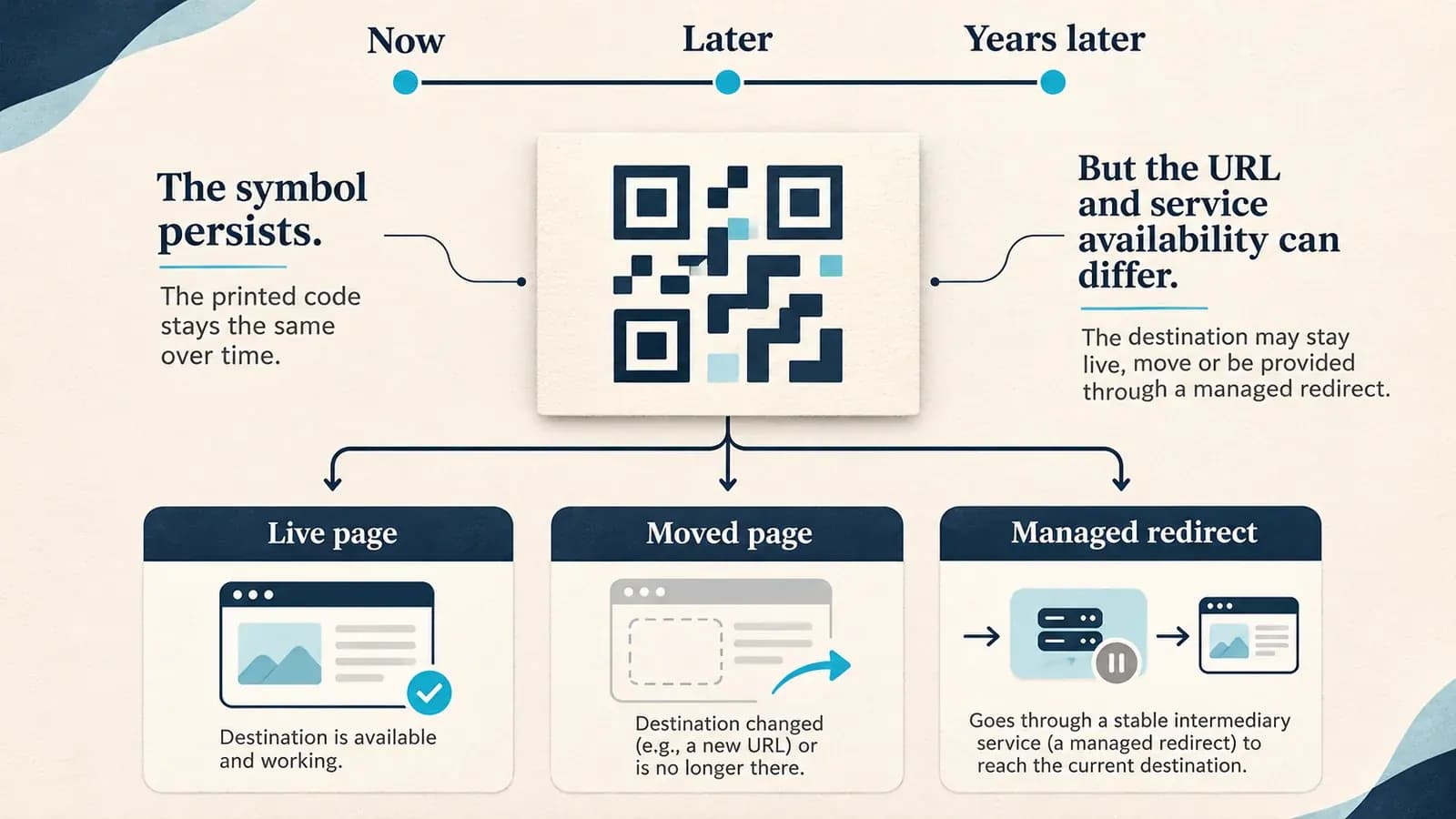
Do QR codes expire? The black-and-white pattern itself does not have a built-in expiry date. A QR code can remain readable for years because its encoded data stays the same. But a successful scan is not a guarantee that the website, offer, account, or redirect behind the code will still work. That distinction matters when you are printing a menu, product label, business card, or sign you expect people to use later.
Think of a QR code as a way to store information, not a promise that every service referenced by that information will remain available. To understand what can stop working, separate the symbol, the data it encodes, and any online systems needed after scanning.
Key takeaways
- A normal QR symbol does not contain an automatic expiration timer.
- A static code keeps the same encoded content; a linked page can still disappear or move.
- Some managed QR services can suspend redirect links when a trial or subscription ends.
- “Permanent QR code” is meaningful only when the underlying destination or service is maintained.
- For long-lived print, use a URL you control, test the final output, and plan for link maintenance.
Do QR codes themselves have an expiration date?
No. The QR Code format encodes information into a two-dimensional pattern that a compatible reader can decode. DENSO WAVE, the developer of the QR Code, explains that a code can hold text, numeric information, symbols, and binary data. There is no universal countdown that begins when a code is created or printed. You can read the underlying technical overview from DENSO WAVE.
For example, if you encode the plain text Welcome to our store, the printed code does not need a website to recover that text. Likewise, a code containing a Wi-Fi configuration does not suddenly forget those characters after a month. The relevant Wi-Fi network or credentials may change, however, making the information less useful. A website QR code stores an address that the phone then attempts to open; whether it opens is a separate question.
Even an unexpired symbol can become impossible to scan if the print fades, the surface is damaged, contrast is poor, or the reader cannot recognize the pattern. DENSO WAVE documents QR error correction, but also notes that it cannot recover data from every degree of damage. Physical durability and technical readability are different from an expiration date.
The four things people call “QR code expiration”
When someone says their QR code expired, the actual failure usually belongs to one of four layers. Identifying the failed layer prevents unnecessary reprinting and helps you decide who can fix it.
| Layer | What can stop working | Practical check |
|---|---|---|
| Printed symbol | Fading, damage, low contrast, or poor printing | Try scanning a clear original and the physical copy |
| Encoded destination | A moved page, deleted file, disabled offer, or changed Wi-Fi password | Inspect the decoded data and open the address directly |
| Domain and hosting | Domain registration lapses, DNS changes, or website outage | Check whether the domain and destination work without the QR code |
| Managed redirect service | Trial ends, subscription changes, redirect disabled, or service closes | Identify the intermediate URL and review provider terms |
The same symptom—“it scans but does not open”—can have several causes. A code may decode perfectly while the web server responds with an error. Under the HTTP standard, a 404 response means the requested resource was not found; it does not mean the QR pattern expired.
 An unreadable print, broken link, domain outage, or disabled redirect can each cause a different failure.
Why do some QR codes stop working after a free trial?
A QR creation website may provide a managed redirect rather than encoding your final destination directly. In that setup, the printed symbol points to an address controlled by the QR service. Its server decides where visitors go next. Some providers attach that redirect to an account, campaign, trial, or paid subscription. If the service suspends the link, the printed pattern remains decodable but visitors may reach an error page or account notice.
This is a provider-policy risk, not a rule built into the QR Code format. Policies vary: a provider may keep a code active, limit editing or analytics, or stop serving a redirect. Do not assume every paid QR product expires, and do not assume an advertised “free” code will remain available without reading the service’s actual terms. Check whether the decoded URL belongs to your domain or the provider’s domain before committing to a large print run.
A static QR code does not depend on a QR platform's redirect server when it directly encodes the destination. The FreeCodeQRGenerator generator describes its output as static codes and says it runs locally in the browser without an account. That removes a generator-managed redirect from this workflow; it does not guarantee that an external website or resource you encode will remain online.
Static QR codes: permanent pattern, potentially temporary destination
In everyday terms, a static QR code is one whose encoded content is fixed once generated. If it contains https://example.com/menu, scanning it later will still reveal that address. You cannot update the stored characters remotely after printing. This makes it straightforward for an address you own and maintain, and less forgiving if you print a third-party campaign URL that later disappears.
The apparent contradiction is important: a code can be permanent while its usefulness is temporary. A restaurant may replace its menu site, a product page may be discontinued, or an event organizer may remove a registration form. The printed symbol still carries the original address, but the online resource has changed.
If you are deciding between direct encoded URLs and editable redirects, the separate guide Static vs Dynamic QR Codes: What Can Change After Printing? covers the destination-editing mechanism. Here, the focus is lifespan: who maintains each dependency, what a lapse looks like, and how to prevent avoidable failures.
How a link, domain, or redirect can fail over time
The page moves or is deleted
A perfectly readable QR code can lead to a 404 error if its exact target path no longer exists. This is common when site owners reorganize folders or replace a campaign landing page. If you control the website, a suitable server-side redirect from the old URL to a relevant live page can preserve access without changing the code. GS1’s guidance for QR-linked product information specifically explains that maintaining a redirectable address can help keep printed codes useful as online resources move.
The domain registration lapses
Web addresses depend on domain registration and DNS. ICANN explains that domain registrations need renewal and that services may stop working when registration expires. If you lose the domain, every code using that hostname may be affected even though every printed symbol is intact. Read ICANN’s domain renewal guidance if you manage a branded domain.
The linked resource or permission disappears
Some codes lead to a private document, booking page, payment page, or short-lived invitation. The link may require login, carry an access token, or be disabled by the resource owner. In those cases the resource’s permissions and validity conditions—not the QR standard—determine whether a visitor can continue. A time-limited ticket can also be intentionally rejected by the ticketing system even though its symbol remains readable.
A redirect provider changes or closes its service
When the encoded address is managed by someone else, you depend on that operator continuing to host the route. The route may break after a billing issue, account closure, policy change, or service shutdown. Your choices may be limited if you do not control the encoded hostname. That is why long-term QR planning starts with understanding the URL that is actually inside the code—not just the final page shown after scanning.
 Direct links depend on the destination; managed links also depend on the redirect provider.
Worked example: a café menu printed for three years
Imagine a café prints 2,000 table cards in 2026. Each card encodes https://cafe-example.com/menu, an illustrative address on a domain the café owns. In 2027, the café moves its menu to https://cafe-example.com/food-and-drink. The original QR code still points to /menu. Rather than throwing out the cards, the café configures that old path to redirect to the new menu and tests it from a phone.
Now imagine the same cards instead contain a link under an unrelated QR provider’s domain. If that provider disables the route after a trial and will not restore it, the café cannot repair the encoded hostname on its own. It may need the provider to reactivate the link or may have to reprint the cards. The key difference is control of the durable address, not the physical age of the QR pattern.
This example illustrates a maintenance strategy; it is not a claim that any particular provider has a specific trial policy. GS1 discusses persistent addresses and updateable redirects in its Digital Link guidance. A persistent URL still needs responsible ownership, renewal, and monitoring; the word “permanent” alone does not supply those safeguards.
How to create a QR code intended to last
- Choose the right destination. For a multi-year printed item, prefer a concise URL on a domain you control. Avoid temporary tracking links, one-time invitations, or resources that are likely to be removed.
- Decide who owns the route. If you need flexibility, configure and maintain your own redirect before encoding the URL. A static generator does not automatically provide an editable redirect.
- Create the code. Enter the chosen final or controlled redirect URL in a static generator. For a practical walkthrough, see How to Create a QR Code for a Website Link.
- Inspect what is encoded. Scan a sample and read the actual URL before opening it. Verify the hostname, spelling, and expected page.
- Test the real printed design. Check readability at the intended size, with the selected colors, on representative phones and materials. Test the URL as well as the scan.
- Maintain what the code depends on. Renew the domain, preserve legacy paths, monitor important landing pages, and keep a record of which printed materials use each address.
Can you tell whether an existing QR code has “expired”?
Start by scanning it with a trusted phone camera or QR reader. Look at the decoded result before navigating. If you see plain text, the QR pattern is readable, and there may be no website involved. If you see a web address, copy or inspect the domain and the path. Then follow this decision table.
| Observation | Likely explanation | Next action |
|---|---|---|
| Camera cannot recognize the pattern | Print or scanning problem | Try the original artwork in good lighting |
| URL appears, but page says not found | Missing or moved destination | Check the exact path; ask its owner about a redirect |
| URL opens a QR service payment notice | Possible managed-link restriction | Review provider account, plan and terms |
| Browser cannot reach the domain | DNS, hosting, or registration issue | Investigate the hostname independently |
| Page loads but access is denied | Permissions, token, or offer restriction | Contact the resource owner; check validity rules |
Do not assume an unfamiliar redirect domain is safe. The US Federal Trade Commission warns that malicious QR codes can route people to deceptive sites; it advises inspecting the URL for suspicious spelling before opening it. See the FTC’s QR safety advice. Security checks remain important even when a QR code scans successfully.
Is a “lifetime” or “permanent QR code” guaranteed to work forever?
Not in the broad sense people often imagine. “Permanent” may accurately describe a fixed, standards-based symbol, while “lifetime” in a commercial offer may describe a provider-defined service term. Neither phrase ensures that a third-party domain, event page, or user account will remain available indefinitely. Ask exactly which component is promised: the encoded pattern, a hosted short URL, the redirect service, analytics, or editing access.
Frequently asked questions
Do free QR codes expire after 30 days?
No universal 30-day rule exists. A directly encoded static QR symbol has no built-in 30-day expiry. Some vendors may limit managed links or trial-based services, so check how the particular code was created.
Can a printed QR code stop working after a year?
Yes, but not simply because a year passed. Print damage, changed Wi-Fi credentials, a removed webpage, an expired domain, or a disabled redirect can prevent the intended action even when the encoded data is unchanged.
Will a QR code keep working if I cancel a subscription?
It depends on whether the code stores the final information directly or points to a provider-managed URL. Read the provider’s cancellation terms and inspect the URL encoded in the existing symbol.
Can I renew an expired QR code?
There is no standard QR-symbol renewal process. You may be able to restore the linked webpage, domain, or managed redirect. If you cannot control or recover the encoded destination, creating and distributing a replacement code may be necessary.
Do Wi-Fi QR codes expire?
The stored network details do not contain a universal expiry date. The code may stop helping visitors connect if the network name, security settings, or password changes, or if the network becomes unavailable.
Do event and ticket QR codes expire?
The symbol itself still decodes, but the event or ticketing platform may enforce a deadline, one-time redemption, or entry rule. That application-level validity is separate from QR Code encoding.
Can I change a link in a QR code after printing it?
You cannot remotely rewrite the data inside the printed pattern. If the encoded address is a redirect you control, however, you may update where that address leads without changing the printed code.
Are QR codes on business cards permanent?
The pattern can remain usable as long as it is readable, but a website, profile, or contact detail behind it can change. A stable domain or durable contact information is generally a better fit than a temporary campaign link.
Bottom line: protect the address, not just the pattern
QR codes do not expire by the passage of time alone. What makes an apparently expired code fail is usually a physical scanning problem, an unavailable destination, a domain issue, or a provider-controlled service restriction. Before printing at scale, understand the exact encoded data and decide who will maintain its destination.
Need a QR code for a destination you plan to maintain? Start with a static code and test both the scan and the link before sharing or printing.
Create a static QR code